
Verifying a domain on the Baidu Search Resource Platform (百度搜索资源平台, Bǎidù Sōusuǒ Zīyuán Píngtái) turns a URL into a property you can pull data from and submit pages to. The job takes ten minutes, assuming the hosting cooperates and the WordPress side is already China-ready. Getting the account that sits behind it is the hard part, and that is a separate piece.
Baidu held 46.65% of the search engine market in China across all platforms in September 2026, by Statcounter’s measure, and 60.15% on mobile. Source: Statcounter Global Stats, September 2026. https://gs.statcounter.com/search-engine-market-share/all/china and https://gs.statcounter.com/search-engine-market-share/mobile/china
Treat that number as a range rather than a constant, because Statcounter’s China panel swings hard from month to month. The scale is what matters. This is the search engine you are verifying for.
Adding the site
Site management (站点管理, zhàndiǎn guǎnlǐ) is where domains get added, and Baidu asks for the protocol along with the host. You enter https:// or http:// explicitly, because Baidu treats them as different properties.
Add the host you want ranked. Not a redirect of it, not a staging subdomain, not the version your CDN happens to serve. If your canonical host is www and the bare domain 301s to it, verify www.
Method one: file verification
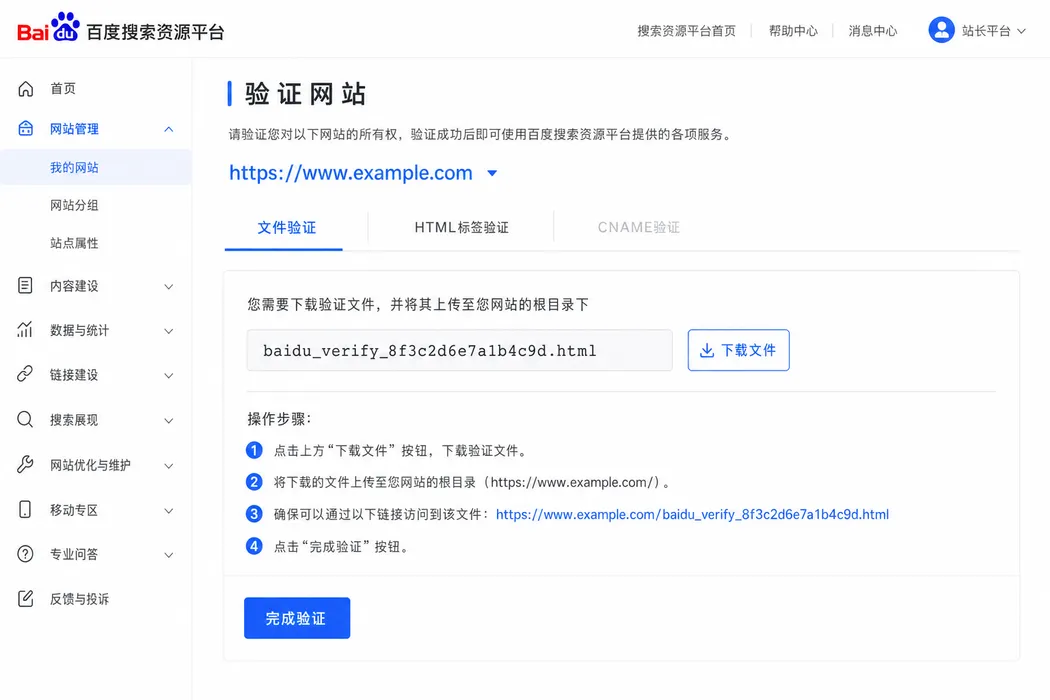
File verification (文件验证, wénjiàn yànzhèng) is the method to use whenever you can deploy files.
Baidu generates an HTML file named on the pattern baidu_verify_codeva-CODE.html. It goes in the document root of the exact host being verified. Where that root lives depends on your stack. Shared hosting on Alibaba Cloud (阿里云, Ālǐ Yún) usually calls it htdocs. Hong Kong cPanel accounts call it public_html. Panels like BT call it wwwroot. On an Astro build it belongs in the public directory, where it gets copied to the root at build time and served as a static file. On WordPress it sits alongside wp-config.php, and any security plugin that blocks unknown root files needs an exception, which is a fun thirty minutes to discover on launch day.
Three things decide whether this works. The file has to answer with a 200 status, it must not redirect anywhere, and it cannot sit behind authentication or a bot challenge.
Leave the file deployed once you are verified. Baidu re-checks periodically, and a file that disappears in the next release takes the verification with it.
Method two: HTML tag verification
If the file route is closed to you, this is the fallback.
HTML tag verification (HTML标签验证, HTML biāoqiān yànzhèng) puts a meta tag inside the homepage head. Use it when you cannot drop files at the root, which happens on managed platforms and on some enterprise CDNs.
The tag carries your code in the content attribute and belongs between the opening and closing head tags on the homepage. In WordPress it goes in the theme header or through whichever SEO plugin owns the head. In Astro it belongs in the shared layout so a rebuild cannot drop it.
One requirement matters more than the others. The tag has to be present in the HTML the server delivers. If it is injected by client-side JavaScript, Baidu will not see it, and neither will you when you view source with scripting disabled.
If the site sits behind a full-page cache or a CDN, purge after you deploy. Baidu reads the cached copy, not the origin.
The method that no longer works
CNAME verification (CNAME验证, CNAME yànzhèng) was suspended in the first quarter of 2023.
站点管理-验证网站暂停【CNAME验证】的方式。该调整对已完成验证的站点没有影响。
Site management has suspended the CNAME verification method. The change does not affect sites that were already verified.
Source: Baidu Search Resource Platform, official announcement, February 2023
Sites verified that way before the change kept their status. New sites have two options, not three. If a guide still offers you three, check the date on it before you trust the rest of the page.
Which one to pick, and why teams ship both
If you control deployments, use the file. It is inert, it does not depend on template rendering, and no theme change is going to eat it.
If your homepage is generated by a platform you cannot drop files into, use the tag and put it somewhere a redesign will not quietly delete.
Plenty of teams ship both. Baidu does not mind, and we have never regretted the redundancy on a client site.
After it goes green
Two things are worth doing the same afternoon. Enter your ICP filing number (备案号, bèi’àn hào) under site attributes, because new sites appear to get through the early crawl phase faster with it filled in. Then run crawl diagnosis (抓取诊断, zhuāqǔ zhěnduàn) against the homepage and a couple of deep pages, so you learn what Baiduspider actually receives before you start publishing into the site.
If verification fails instead of going green, the cause is usually a redirect on the homepage, a firewall rule blocking Baiduspider, or a homepage that only exists after JavaScript runs. Each of those has its own fix, and none of them means your site is broken for human visitors.
Need help with this?
ChinaWebFoundry handles WordPress projects in China end to end. If any of this feels like more than you want to tackle alone, get in touch.
Talk to Us