
If your public site loads in Shanghai but the WordPress admin is slow in China, look at the calls only the back end makes. Three are worth checking first. Gravatar comes up on every admin screen, and it is blocked. Then a mainland server asks WordPress.org for updates and gets rate limited. The editors’ fonts come from Google, which answers some networks in China and not others.
Two of the three come from your team’s browser. One comes from your server, and only if it sits in the mainland.
| What calls out | Who makes the call | Where it goes | What the team sees | First fix |
|---|---|---|---|---|
| Avatars | The browser in China | secure.gravatar.com, blocked | Empty avatar boxes on every screen | Switch avatars off, or point them at a mainland mirror |
| Update checks | A mainland server | api.wordpress.org, rate limits mainland IPs | Updates stop appearing; a stalled check holds the page | A mirror, or updates run from outside |
| Editor fonts | The browser in China | fonts.googleapis.com, fonts.gstatic.com | The Elementor editor waits on a stylesheet; Google font installs fail | Repoint Elementor’s Roboto, skip Google font installs |
Every source below was checked on 12 October 2026.
Why the WordPress admin is slow in China
China performance work tends to start on the public page, because customers see it. The dashboard waits until the Shanghai marketing team can’t publish on a Monday morning.
Start by asking which machine makes each call. Your visitors never open wp-admin, but your editors do, from an office or a home line in China, and their browser fetches everything the admin screens ask for. Separately, your server makes its own calls home to WordPress.org while it builds those screens.
That split decides the fix. On a server in Frankfurt, the update calls leave from Frankfurt and get through, so only the browser side hurts. Put the site on a mainland server and both sides do.
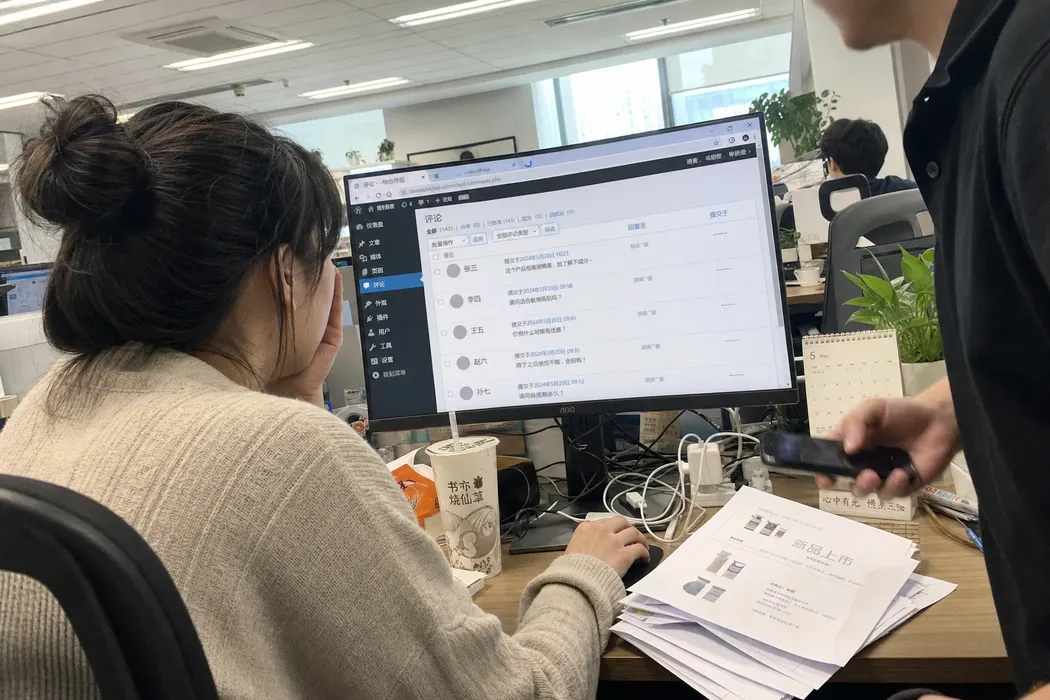
To see the browser side, have someone in the Shanghai office open developer tools on the Network tab, load the Comments screen and filter for “gravatar”. The server’s update calls never show up there.
Gravatar is on every admin screen
WordPress builds every avatar from one address, secure.gravatar.com, and it
puts avatars in more places than most teams expect. There is one in the admin
bar on every screen, with a larger copy in its menu. Comments and Users get one
per row, and the Dashboard’s Activity widget adds one for each recent comment.
GreatFire reads https://secure.gravatar.com as blocked in mainland China: its one recent conclusive test failed, last tested 31 August 2026. All 29 gravatar.com addresses it has tested read blocked. Source: GreatFire, August 2026. https://en.greatfire.org/https/secure.gravatar.com
Every one of those images is a request the browser can’t complete. The page still renders. The avatar box stays empty, and nothing on screen says a request failed.
Settings > Discussion is the worst screen of all.
It draws a preview of every default avatar style, ten of them, and it does so even when avatars are switched off.
WordPress 7.1.3 adds a filter before drawing the ten default-avatar choices on the Discussion settings screen, commented “Force avatars on to display these choices.” Source: WordPress core 7.1.3, wp-admin/options-discussion.php, read 12 October 2026. https://raw.githubusercontent.com/WordPress/WordPress/7.1.3/wp-admin/options-discussion.php
Unticking Show Avatars on that same screen takes the avatars off every other admin page.
The update servers and the silent 429
This one only bites when the server sits in mainland China.
WordPress.org rate limits Chinese network sources, and it has said so in writing since 2020.
A user in China reported HTTP 429 errors on every WordPress.org subdomain. WordPress.org replied that several Chinese network sources are rate limited “due to a high level of abuse and non-legitimate traffic”, and that it won’t whitelist them or offer an official way to replicate WordPress.org through a Chinese proxy. Source: WordPress.org Meta Trac, ticket #5106, 21 March 2020. https://web.archive.org/web/20260116133057/https://meta.trac.wordpress.org/ticket/5106
That reply is from 2020, and we can find nothing more recent from WordPress.org on the subject.
The main site answers from the mainland. The 429 is WordPress.org’s own rate limit.
GreatFire reads https://wordpress.org as not blocked, 13 of 13 recent conclusive tests connecting normally, last tested 11 October 2026. It reads http://api.wordpress.org as not blocked on one conclusive test on 7 October 2026, and has never tested https://api.wordpress.org. Source: GreatFire, October 2026. https://en.greatfire.org/https/wordpress.org
A 429 comes back quickly. WordPress reads it as a failed check and gives up without a word, so no update notice appears and the site falls behind. That’s the security half of the problem, and our guide on whether WordPress is blocked in China covers what it means for patching.
The slow half comes from a connection that hangs without answering. WordPress makes these checks while it builds an admin page, and it waits.
Outside a cron run, the core version check waits up to 3 seconds. The plugin and theme checks wait 3 seconds plus 1 more for every 10 plugins or themes installed. If the HTTPS request fails, each check tries again over plain HTTP. Any answer other than HTTP 200 ends the check silently. Source: WordPress core 7.1.3, wp-includes/update.php, read 12 October 2026. https://raw.githubusercontent.com/WordPress/WordPress/7.1.3/wp-includes/update.php
The checks run on the first admin page opened after 12 hours. The Plugins screen repeats them hourly, Dashboard > Updates every minute. With 40 plugins, a stalled plugin check can hold the Plugins screen for 7 seconds, then the same again over HTTP (our arithmetic, from the timeouts above).
Google fonts inside the editor
Core’s block editor loads no Google Fonts on a public page. Its Font Library does call Google: when someone installs a Google font, WordPress asks permission, then their own browser downloads each file and uploads it to the site.
The WordPress 7.1.3 editor tells the user: “To install fonts from Google you must give permission to connect directly to Google servers.” Its downloadFontFaceAssets function then fetches each file in the browser. Source: WordPress core 7.1.3, wp-includes/js/dist/editor.js, read 12 October 2026. https://raw.githubusercontent.com/WordPress/WordPress/7.1.3/wp-includes/js/dist/editor.js
The files sit on fonts.gstatic.com, and whether that host answers depends on
which network the editor happens to be on.
From an Alibaba Cloud (阿里云) instance in cn-zhangjiakou, sampled every ten minutes for 12 hours on 28 August 2026, fonts.googleapis.com answered 72 of 72 requests at a median 111ms time to first byte and fonts.gstatic.com 72 of 72 at 102ms. Across page loads on a Beijing China Mobile (中国移动) home line on 30 August 2026, the same hosts answered 0 of 54 and 0 of 6 requests. Source: 21YunBox, A Chinese Cloud Probe Is Not a Chinese Visitor: The Same Hosts, Opposite Answers, 28 to 30 August 2026. https://www.21cloudbox.com/a-day-of-third-party-requests-from-inside-china.html
(No Elementor on the site? Skip to the mirrors.)
Elementor is where this gets specific. Its editor loads Roboto from
fonts.googleapis.com as part of its own stylesheet, and that call ignores the
Google Fonts setting. Switching Google Fonts off under Elementor > Settings >
Advanced changes the public page only. The editor still calls Google.
In Elementor 4.3.4, released 5 October 2026, the editor loader registers a Roboto stylesheet from fonts.googleapis.com with no condition and makes the editor’s main stylesheet depend on it. The admin top bar on Elementor’s own admin screens loads Roboto from the same host, also with no condition. Source: Elementor 4.3.4 plugin source, read 12 October 2026. https://downloads.wordpress.org/plugin/elementor.4.3.4.zip
That stylesheet loads in the head of the page.
“CSS is render blocking: the browser blocks page rendering until it receives and processes all the CSS.” Source: MDN Web Docs, Critical rendering path, February 2025. https://developer.mozilla.org/en-US/docs/Web/Performance/Guides/Critical_rendering_path
On a line where fonts.googleapis.com goes quiet, the editor waits for a font
it doesn’t strictly need.
Deleting the call needs care. The editor’s main stylesheet depends on the
google-font-roboto handle, and WordPress skips any stylesheet whose dependency
is missing, so deregistering it drops the editor’s styles too. Point the handle
at a copy of Roboto on your own server instead.
s.w.org, which serves the emoji images and the Font Library previews, looks
fine.
GreatFire reads https://s.w.org as not blocked on its one recent conclusive test, last tested 7 October 2026. Source: GreatFire, October 2026. https://en.greatfire.org/https/s.w.org
Mainland avatar mirrors
You can keep avatars and still lose the Gravatar call. Cravatar is a mainland avatar service run by a Guangzhou company under its own ICP filing (ICP备案), and it takes the same URL shape as Gravatar.
Cravatar’s API takes requests at https://cravatar.cn/avatar/ followed by the email hash. If the address has no Cravatar avatar, it tries the Gravatar avatar and then the QQ avatar before falling back to a default. Source: Cravatar developer documentation, September 2024. https://cravatar.com/developer/api
For WordPress, Cravatar publishes a short get_avatar_url filter that swaps the
gravatar.com hostnames for cravatar.cn. The plugin it suggests for
non-developers, WPAvatar, was last updated in September 2025 and is listed as
tested up to WordPress 6.8, which makes the filter the safer choice on a 7.1
site.
We print no speed figure for Cravatar. The numbers in circulation carry no vantage point and no date, and GreatFire has never tested cravatar.cn.
What to disable, what to mirror, what to accept
| Problem | Disable | Mirror | Accept |
|---|---|---|---|
| Gravatar | Untick Show Avatars under Settings > Discussion | Cravatar, by filter or WPAvatar | Ten previews on the Discussion screen, if you only untick |
| Update checks on a mainland server | Keep them: you need the updates | A mirror plugin, or updates run from outside the mainland | Late updates, if neither is set up |
| Elementor’s editor Roboto | Swap the handle’s source in code, on staging first | Load Google Fonts Locally (Settings > Performance) covers the public page only | A slower editor on some lines |
| Font Library installs | Skip the Google collection | Upload font files you host yourself | One-off installs done on a connection that reaches Google |
The afternoon goes like this. Switch avatars off, or add the Cravatar filter and check the Comments screen in the Shanghai office. If the server is in the mainland, decide how it gets its updates. Leave the Elementor work for a developer with a staging copy.
The best-known mirror project, WP-China-Yes, was closed in the WordPress.org directory in April 2020 and continues on GitHub as WPCY.COM. It routes WordPress.org traffic through mirrors and swaps Gravatar for Cravatar. When a mirror fails, it falls back to the original host. It’s third-party code between your site and its updates. Read it first. The other route is a deploy pipeline that runs updates from outside the mainland.
Plugins add calls of their own, and our guide to the plugins that break in China goes through them. Our WordPress in China page covers the bigger question of where WordPress should live.
Frequently asked
Does switching off avatars break anything?
No. With Show Avatars off, WordPress draws no avatar, so the admin bar and the Comments and Users lists drop the picture, and so do comment threads on the public site. A theme that forces avatars on can still request them. Check both after the change.
Is the slowness the Great Firewall or the distance to our server?
Both, and they add up. Gravatar fails and the Google font hosts go quiet on some lines, wherever the server sits. A server in Europe also adds a cross-border round trip to every admin click, which nothing here removes. Clear the failing calls first. What’s left is distance, or the server itself.
Our admin theme loads jQuery from Google. Does that matter?
Yes. GreatFire read ajax.googleapis.com as blocked on its last conclusive test, on 22 August 2026. A plain script tag in the head holds the page until it loads, so that theme stalls on every screen. WordPress ships its own copy of jQuery, and the theme should use it.
Will Cravatar show the pictures our team already set up on Gravatar?
Usually. Cravatar’s documentation says that when an address has no Cravatar avatar, it looks for the Gravatar one, then the QQ one, before using a default. Your team keeps its pictures with no new account. GreatFire has never tested cravatar.cn. Try it from the office once.
Do we need to move hosting to fix this?
Not for avatars or fonts. Those are calls from your team’s browser, and they fail the same way whether the server is in Shanghai or Frankfurt. The 429 on updates only applies to a mainland server. Moving there shortens the distance, and then the update problem applies to you.
Need help with this?
ChinaWebFoundry handles WordPress projects in China end to end. If any of this feels like more than you want to tackle alone, get in touch.
Talk to Us