
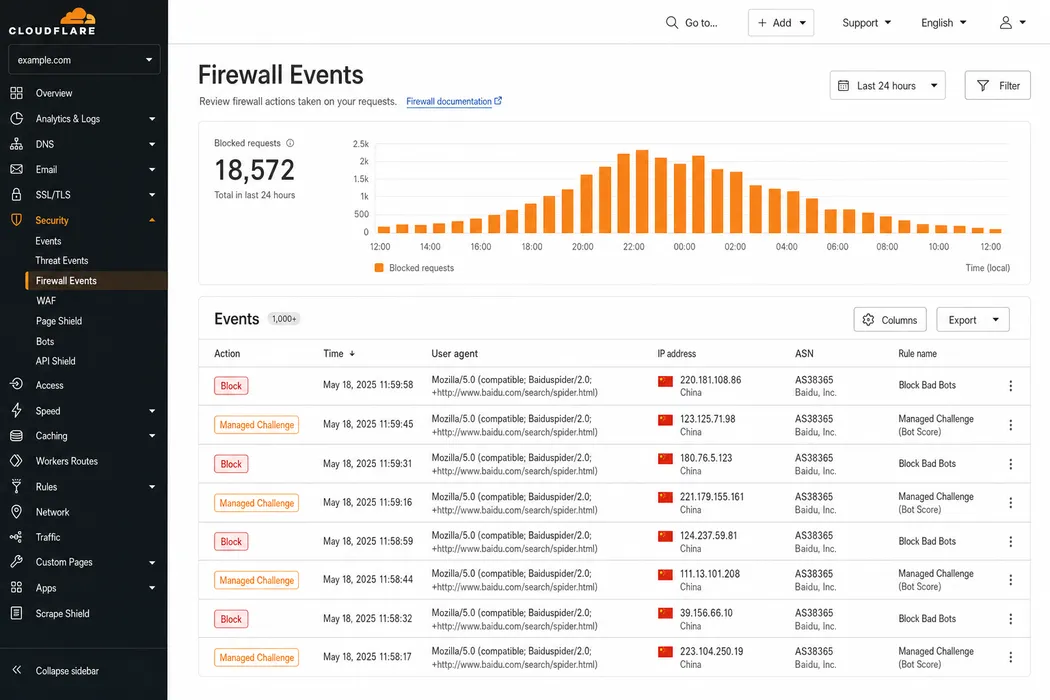
Nothing in a normal monitoring stack is watching for this. Uptime checks run from Frankfurt and Virginia, and real user monitoring only sees people who already got a page. Meanwhile the one visitor that matters is being turned away at the edge, and the only place that shows up is a dashboard nobody has opened.
We see it more than any other technical cause of a stalled China launch, well ahead of anything in the WordPress build itself, and it is almost always a setting nobody remembers making.
Why your default rules catch Baidu’s crawler
Baiduspider reaches your origin from mainland China networks. Reverse DNS on legitimate crawler addresses resolves to *.baidu.com or *.baidu.jp, with the mainland ranges doing most of the fetching.
Now think about what a standard security posture does with those ranges. There is usually a geo rule that challenges or blocks China, added during an incident and never revisited, plus a bot management setting that scores unfamiliar automated clients as suspicious. Underneath both sits a managed ruleset tuned on Western traffic. Not one of those rules was written with a Chinese search crawler in mind. Baiduspider looks like automated traffic from a region you decided to distrust, so it gets whatever you configured for that.
None of it generates an alert. A blocked crawler does not file a ticket. It retries, gets the same answer, and comes back less often.
Baidu held 46.65% of the search engine market in China across all platforms in September 2026, by Statcounter’s measure, and 60.15% on mobile. Source: Statcounter Global Stats, September 2026. https://gs.statcounter.com/search-engine-market-share/all/china and https://gs.statcounter.com/search-engine-market-share/mobile/china
That market sits on the other side of the rule.
The case that never got resolved
There is a Cloudflare community thread worth reading once. A site owner had put the Baidu verification file, baidu_verify_codeva-CODE.html, at the document root. It resolved publicly, and anyone outside China could fetch it and get a 200. Baidu’s check reported an i/o timeout. The thread closed without a resolution.
That case is not evidence that Cloudflare blocks Baidu as policy. It shows something narrower: a file reachable from your desk proves nothing about whether Baidu can reach it, and the two can disagree for weeks while everyone stares at a URL that works.
Baidu’s file verification is narrow. The file sits at the document root and returns a 200, with no redirect and no authentication. The HTML tag method is no more forgiving, since the meta tag has to appear in the HTML the server delivers. An interstitial breaks both.
A 403 is the good outcome
When the edge refuses Baiduspider outright, you get a 403, which is the outcome to hope for. A refusal is a fact both sides can see.
The expensive version is the challenge. A JavaScript interstitial returns a 200, your access logs record a served request, and the crawler gets a page of script where your content should be. Every dashboard you own says the request succeeded, and on Baidu’s side there is a fetch with nothing in it.
Rate limiting is the third pattern and the worst to debug. The crawler gets through on Tuesday and not on Wednesday, and no rule you can point at explains why.
Reverse DNS is the only check that holds
Allowing the user agent is the right place to start and the wrong place to stop. The legitimate strings are Baiduspider/2.0 and Baiduspider-render/2.0, with mobile variants carrying Android or Mobile. The render variant catches people out. It pulls what a page needs to render, so a rule that allows Baiduspider/2.0 and rate limits the rest lets the crawler in and then starves it.
A user agent is a request header, and a request header is a string anyone can type. Allow on that alone and you have opened your WAF to anyone who reads a blog post.
The check that holds up is a forward-confirmed reverse lookup. Take the client IP, resolve the PTR record with host or dig, confirm the hostname ends in baidu.com or baidu.jp, then resolve that hostname forward and check you get the same address back. A PTR record alone proves nothing, since it is set by whoever controls the address block.
Build the rule in that order: match the user agent, confirm with reverse DNS, then allow. Some edge platforms do this for known crawlers. Where yours does not, it is a short worker script.
Baidu’s own guidance describes the same two lookups and adds a line about IP lists.
A genuine Baiduspider hostname ends in .baidu.com or .baidu.jp, and anything else is impersonation. A forward lookup of that hostname must return the original IP. Baidu says it cannot publish its crawler’s IP ranges because they change. Source: Baidu Search Resource Platform (百度搜索资源平台), February 2022. https://ziyuan.baidu.com/college/articleinfo?id=3378
Chinese SEO blogs still publish lists of Baiduspider IP ranges. An allowlist built from one is a snapshot of addresses Baidu says will move. Verify the crawler by reverse DNS every time, and never by user agent.
What four WordPress plugins do to Chinese crawlers
On a WordPress site, a second set of rules runs after the edge has let a request through. It lives in the security and cache plugins, and the only crawler exemption we found in any of them is for Google.
We read the source of four plugins on 4 September 2026, then again on 9 October 2026 against the current releases. Two of them can turn Chinese crawlers away once a single setting changes. LiteSpeed Cache and W3 Total Cache have nothing in them that does.
| Plugin | Version read | As shipped | What can turn Chinese crawlers away |
|---|---|---|---|
| Wordfence | 9.0.0, unchanged in 9.0.2 | All five rate limits off. One crawler rule, for Google | A number typed into “If a crawler’s page views exceed” |
| Solid Security, now Kadence Security | 10.0.3, unchanged in 10.0.5 | “Default Ban List” off | Switching it on writes a 403 for 360Spider, EasouSpider and YisouSpider into the server config |
| LiteSpeed Cache | 7.9.1 | “Do Not Cache User Agents” empty | Nothing found in the code |
| W3 Total Cache | 2.10.6, unchanged in 2.10.7 | Rejected user agent lists empty | Nothing found in the code |
That rules out the cache plugins. Their user agent lists only decide which visitors skip the cache, and both ship empty. If Baiduspider gets a 403 on a site running either one, the cause is somewhere else in the stack.
LiteSpeed Cache 7.9.1 ships “Do Not Cache User Agents” empty. W3 Total Cache 2.10.6 ships its rejected user agent lists for page cache, minify and CDN empty, and 2.10.7 is the same. Neither plugin’s code has a rule that names Baiduspider. Source: LiteSpeed Cache 7.9.1 and W3 Total Cache 2.10.6 source code, WordPress.org, read 4 September and 9 October 2026. https://wordpress.org/plugins/litespeed-cache/ and https://wordpress.org/plugins/w3-total-cache/
Wordfence 9.0.0 has a crawler rule for Google only
Wordfence ships all five of its rate limits switched off: all requests, crawler page views, crawler 404s, human page views and human 404s. The master switch, “Enable Rate Limiting and Advanced Blocking”, ships on, so a limit applies the moment someone types a number into it.
Wordfence has one setting about search crawlers, “How should we treat Google’s crawlers”. By default it exempts verified Google crawlers from every rate limit. Wordfence checks them against Google’s IP ranges and a reverse lookup that must end in googlebot.com or another Google hostname, confirmed forward. Baidu gets no equivalent setting, and neither does any other search engine.
Set a number in “If a crawler’s page views exceed”, under the firewall’s Rate Limiting Rules, and Googlebot walks past it while Baiduspider is counted like any other bot. Past the limit it gets a 503, whether the action is left on throttle or changed to block. Wordfence logs the throttle. Baidu just gets a server error, which is the rate limiting pattern described earlier: through on Tuesday, refused on Wednesday.
The obvious fix would be to allowlist Baiduspider. Wordfence’s allowlist, “Allowlisted IP addresses that bypass all rules”, takes IP addresses and ranges and nothing else (the plugin has no user agent allowlist at all), and Baidu, as quoted above, does not publish its ranges.
Wordfence 9.0.0 ships its five rate limits set to DISABLED. Its one crawler setting, “How should we treat Google’s crawlers”, defaults to “Verified Google crawlers will not be rate-limited”. Its allowlist accepts IP addresses and ranges only. Wordfence 9.0.2, the current release, is unchanged. Source: Wordfence 9.0.0 source code (released 10 August 2026), read 4 September and 9 October 2026, and 9.0.2, read 9 October 2026. https://wordpress.org/plugins/wordfence/
Keep Wordfence’s crawler limits off, or set them well above anything a crawl sends. If you need to rate limit crawlers, do it at the CDN or WAF in front of the site, where a rule can run the reverse DNS check before it starts counting.
Solid Security’s ban list refuses 360 Search and Shenma
Solid Security ships under the plugin slug better-wp-security, and since version 10.0.0 in May 2026 it carries the Kadence Security name. Its Ban Users module has a setting called “Default Ban List”, off in a new install. Its description calls it a getting-started point.
Switch it on and the plugin writes the HackRepair.com ban list into your server config: .htaccess on Apache and LiteSpeed, nginx.conf on nginx. That list answers 403 to any user agent containing 360Spider or YisouSpider, plus a third string, EasouSpider. 360Spider crawls for 360 Search (360搜索), YisouSpider for Shenma Search (神马搜索).
Baiduspider isn’t on the list.
Solid Security 10.0.3 ships “Default Ban List” with “default”: false. When it is on, the HackRepair.com list is written into the server configuration and returns 403 to user agents matching 360Spider, EasouSpider and YisouSpider. Kadence Security 10.0.5, the current release, carries the same list. Source: Solid Security 10.0.3 source code (released 27 July 2026), read 4 September and 9 October 2026, and 10.0.5, read 9 October 2026. https://wordpress.org/plugins/better-wp-security/
The rule sits in the server config, so WordPress never sees the request and nothing in the plugin’s own logs records it. A site where someone switched it on at setup has refused 360 Search and Shenma ever since.
Shenma Search’s crawler user agent is yisouspider. Source: Shenma Search (神马搜索) webmaster platform, July 2014. https://zhanzhang.sm.cn/open/optimizaGuide
Turn the Default Ban List off, then open .htaccess or nginx.conf and check that the block beginning ”# Start HackRepair.com Blacklist” has gone. If you want 360 Search back by address, its rules run the other way round from Baidu’s. 360 publishes its crawler’s IP ranges and says reverse lookup does not yet work for it, so an IP allowlist is the method it asks for.
360 Search’s crawler carries 360Spider in its user agent. 360 publishes its crawler’s IP ranges on the same page and says nslookup verification is not yet supported. Source: 360 Search (360搜索), 360蜘蛛IP help page, February 2026. https://www.so.com/help/spider_ip.html
Make Baidu tell you what it received
Crawl diagnosis (抓取诊断) in the Baidu Search Resource Platform (百度搜索资源平台) fetches a URL as Baiduspider and shows you the response. Desktop or mobile user agent, your choice. It returns the first 200KB of the body, enough to reveal an interstitial or an error page.
We reach for it before touching anything else, because it ends arguments. Run it on the homepage, the verification file, and three deep pages. Edge rules are often path-scoped, and the homepage is usually the one path somebody exempted.
Each site gets 70 fetches a week, so it is not a load test. And read the body it returns: a 200 says nothing about what was in it.
Crawl diagnosis allows 70 fetches a week per site and shows the first 200KB of the content Baiduspider can see. Source: Baidu Search Resource Platform (百度搜索资源平台), crawl diagnosis tool page, read 9 October 2026. https://ziyuan.baidu.com/crawltools/index
Offshore hosting makes every one of these worse
Hosting outside mainland China blocks nothing by itself. It adds latency and packet loss on top of whatever your rules are doing.
Give a marginal connection an extra round trip for a challenge and it stops being marginal. An i/o timeout looks exactly like this from the outside: the page loads fast from Europe while Baidu records a connection that gave up. Mainland hosting removes the variable, at the cost of an ICP filing (ICP备案).
The order to change things in
Start with your logs. Filter the edge for the Baiduspider user agents over the last 30 days. Zero requests means the crawler is not getting to you at all. If there are requests, the question becomes what you sent back.
Then take the blunt instruments off in order. Geo rules affecting China go first, or narrow to the paths that genuinely need them. Bot management exceptions for verified Baiduspider come next, then managed ruleset exceptions, once you know which rule fired. Rate limits last, because they are the hardest failure to attribute.
On WordPress, the origin comes next. Turn off Solid Security’s Default Ban List if it’s on, and check whether anyone has set a Wordfence crawler limit.
Check robots.txt while you are in there. Baidu’s tester caps the file at 48KB, and a stray disallow copied from staging has cost more China launches than any firewall rule.
Baidu’s robots tool checks up to 48k of a robots.txt file. Source: Baidu Search Resource Platform (百度搜索资源平台), robots tool page, read 9 October 2026. https://ziyuan.baidu.com/robots/index
Once the rules are off, re-run crawl diagnosis, starting with the verification file, the URL holding up everything else. Verification lands anywhere from instant to 24 hours once the crawler can read it. Index volume is slower: zero for days to weeks even when everything is right, with initial indexing commonly two to four weeks. Change one thing at a time, or the next zero tells you nothing.
Re-run crawl diagnosis after any WAF or CDN upgrade, since edge defaults change on their own schedule.
Need help with this?
ChinaWebFoundry handles WordPress projects in China end to end. If any of this feels like more than you want to tackle alone, get in touch.
Talk to Us